Setup: Difference between revisions
From Mobile Application Design
Jump to navigationJump to search
No edit summary |
No edit summary |
||
| Line 13: | Line 13: | ||
* Please note, I've been using OS X as a quick prototyping platform, but have run into some issues with MIDlets that work perfectly in the emulator, but then do not run on the device. After compiling the same code on an identical Windows machine, it works perfectly on the device. Convenience comes with a price. Develop at your own risk! | * Please note, I've been using OS X as a quick prototyping platform, but have run into some issues with MIDlets that work perfectly in the emulator, but then do not run on the device. After compiling the same code on an identical Windows machine, it works perfectly on the device. Convenience comes with a price. Develop at your own risk! | ||
# Download [http://www.mpowerplayer.com/products-sdk.php MPowerPlayer (OS X only)] | |||
# [http://uberthings.com/teaching/wiki/index.php?title=Java_Setup_Notes#MPowerplayer_MIDP_2.0_SDK Configure MPowerplayer] | # [http://uberthings.com/teaching/wiki/index.php?title=Java_Setup_Notes#MPowerplayer_MIDP_2.0_SDK Configure MPowerplayer] | ||
# Download an IDE + development pack - [http://eclipse.org Eclipse] & [http://eclipseme.org EclipseME] | Alt choice: [http://www.netbeans.info/downloads/index.php Netbeans + Mobility Pack] | # Download an IDE + development pack - [http://eclipse.org Eclipse] & [http://eclipseme.org EclipseME] | Alt choice: [http://www.netbeans.info/downloads/index.php Netbeans + Mobility Pack] | ||
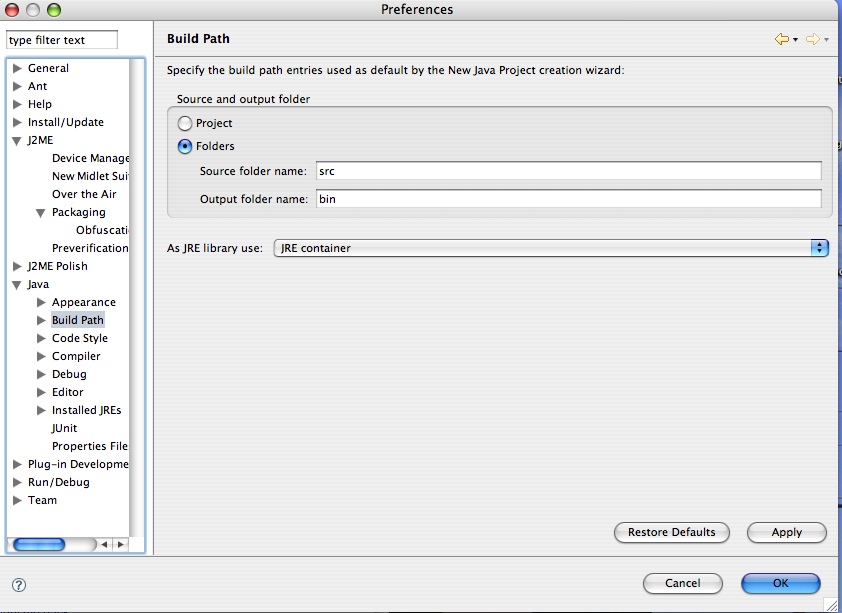
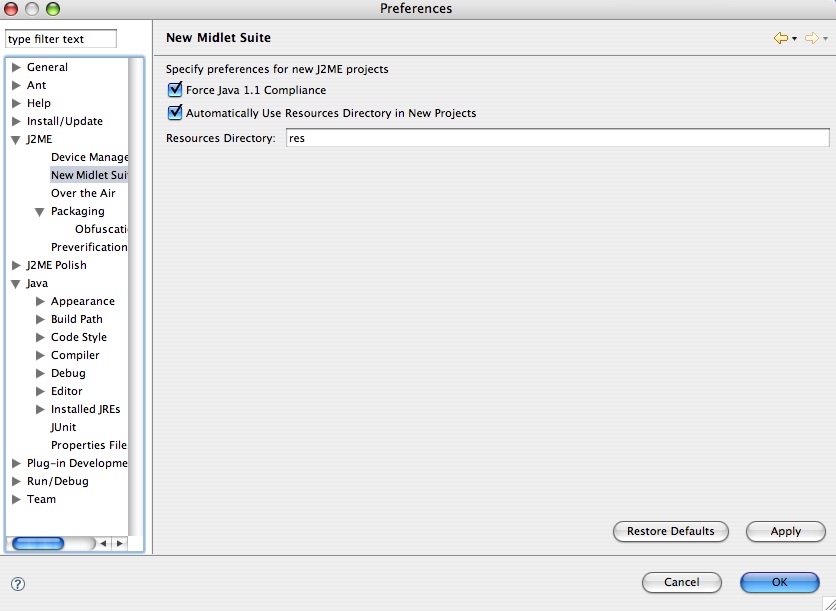
# Setup Eclipse so that [http://uberthings.com/teaching/mobile_application_design/i/java_build_path.jpg source files -> /src] folder and [http://uberthings.com/teaching/mobile_application_design/i/j2me_setup.jpg external files (images, txt files etc) -> /res] folder | # Setup Eclipse so that [http://uberthings.com/teaching/mobile_application_design/i/java_build_path.jpg source files -> /src] folder and [http://uberthings.com/teaching/mobile_application_design/i/j2me_setup.jpg external files (images, txt files etc) -> /res] folder | ||
# [http://eclipseme.org/docs/installEclipseME.html Configure EclipseMe] | # [http://eclipseme.org/docs/installEclipseME.html Configure EclipseMe] | ||
Revision as of 18:45, 31 January 2007
"Just the tools please" Quick Setup
Windows (recommended)
- Download and install Java SE, Development Kit (JDK) - http://java.sun.com/j2se/downloads/index.html. Get the version without any other bundled software.
- Download and install Java ME, Wireless Toolkit (WTK) - http://java.sun.com/products/j2mewtoolkit/. Install this into C:\WTK\.
- Setup and test your paths
- Download one or more emulators / manufacturer SDKs - Nokia | Motorola | SonyEricsson | Danger
- Download an IDE + development pack - Eclipse & EclipseME | Alt choice: Netbeans + Mobility Pack
- Setup Eclipse so that source files -> /src folder and external files (images, txt files etc) -> /res folder
- Configure EclipseMe
Mac OS X
- Please note, I've been using OS X as a quick prototyping platform, but have run into some issues with MIDlets that work perfectly in the emulator, but then do not run on the device. After compiling the same code on an identical Windows machine, it works perfectly on the device. Convenience comes with a price. Develop at your own risk!
- Download MPowerPlayer (OS X only)
- Configure MPowerplayer
- Download an IDE + development pack - Eclipse & EclipseME | Alt choice: Netbeans + Mobility Pack
- Setup Eclipse so that source files -> /src folder and external files (images, txt files etc) -> /res folder
- Configure EclipseMe