Week 2: ZombieDetector
From Mobile Application Design
Zombie Detector
Setup
- Create a new J2ME Midlet Suite in Eclipse by right-clicking in the Package Manager, selecting New -> Project -> J2ME Midlet Suite
- Call this ZombieDetector. Leave everything else as is.
- Right-click on your ZombieDetector project and select New -> Class
- Use src as your package and ZombieDetector as the class name. Click Finish.
- Open your new ZombieDetector class
- Cut and paste the code from below into your file. Save.
- Open up the ZombieDetector.jad file
- Click on the Midlets tab. Click Add.
- Write in ZombieDetector as the MIDlet name.
- Click in the button that appears in class. You may have to start typing Zombie in. It should find your class automatically. If nothing happens, try closing all the files down and opening them again.
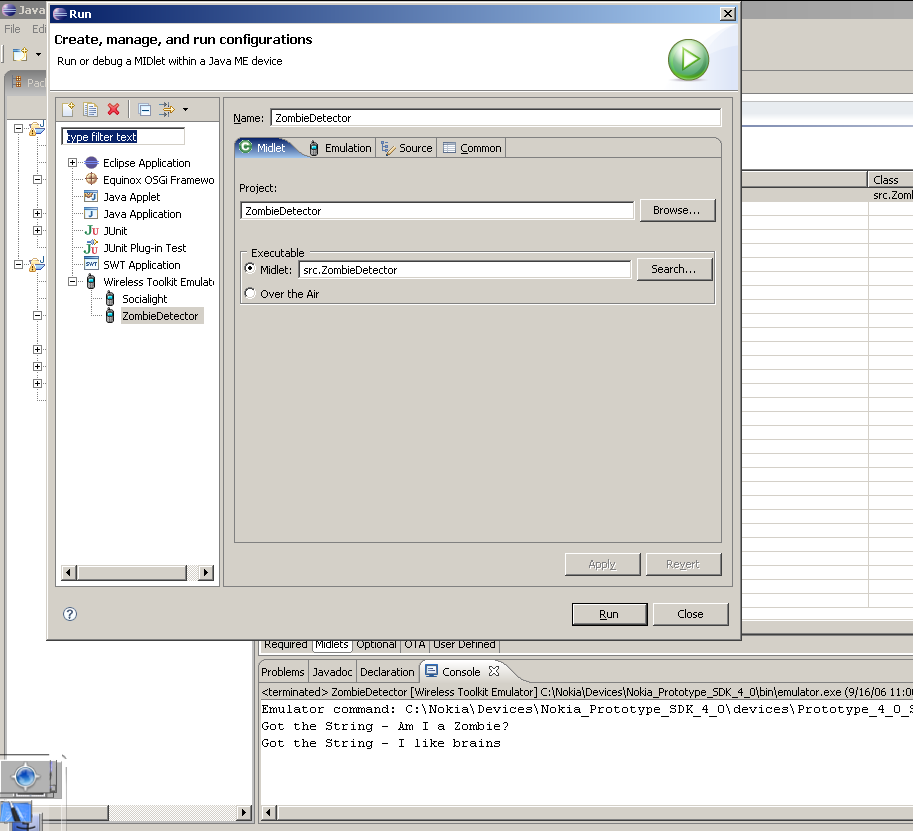
- Right-click your project again, select Run As, then Run...
- Setup so that it looks something like this -
- Run your MIDlet
/**
* Simple Zombie Detector by Michael Sharon
*
* This program will allow a user to type in a sentence and detect if they are a zombie or not.
*/

//import relevant libraries
import javax.microedition.midlet.*;
import javax.microedition.lcdui.*;

public class ZombieDetector extends MIDlet implements CommandListener {

  //contains a reference to the display
  private Display mDisplay;

  //these are the commands that we will use
  private Command mExitCommand, mDetectCommand, mCancelCommand;

  //high level user interface classes
  private TextBox mSubmitBox;

  //constructor
  public ZombieDetector() {

	//create the commands that we'll be using
    mExitCommand = new Command("Exit", Command.EXIT, 0);
    mDetectCommand = new Command("Detect", Command.SCREEN, 0);
    mCancelCommand = new Command("Cancel", Command.CANCEL, 0);

    //create the textbox that we'll be using
    mSubmitBox = new TextBox("Zombie Detector", "Am I a Zombie?", 64, 0);
    mSubmitBox.addCommand(mExitCommand);
    mSubmitBox.addCommand(mDetectCommand);
    mSubmitBox.setCommandListener(this);
  }

  //startApp is the very first thing run after the constructure
  public void startApp() {
	  //get a reference to the current display - usually the first thing you do
	  mDisplay = Display.getDisplay(this);

	  //display the submit screen
	  mDisplay.setCurrent(mSubmitBox);
  }

  //handles the MIDlet's paused state
  public void pauseApp() {}

  //cleans up when the MIDlet is destroyed
  public void destroyApp(boolean unconditional) {}

  //This gets called whenever we select a command
  public void commandAction(Command c, Displayable s) {
    if (c == mExitCommand) {
      destroyApp(false);
      notifyDestroyed();
    }
    else if (c == mDetectCommand) {
      //start searching for zombies
      zombieSearch();
    }
  }

  //The function which searches for zombies at the phone
  public void zombieSearch() {
	    String word = mSubmitBox.getString();
	    String isZombie = null;
		int zombieCheck = 0;

		//Check if we're dealing with a zombie
		zombieCheck = word.indexOf("brains");

		//See API docs for String.indexOf
		if (zombieCheck == -1)
		{
			isZombie = "This is a live one. No zombies here.";
		}
		else
		{
			isZombie = "Eeek! Run for your lives!";
		}

		//Create a new alert
	    Alert results = new Alert("Definition", isZombie,null, null);
	    results.setTimeout(Alert.FOREVER);

	    //Display the alert, then the submit field again
	    mDisplay.setCurrent(results, mSubmitBox);
	  }

}

