Categories
Life Tools

3 Types of Productivity – Making the Most of a Working Day

Digital Digressions: 3 Types of Productivity – Making the Most of a Working Day

A fantastic article. His general classifications of productivity are short, concise and extremely accurate. This definitely applies to a greater part of my working life, particularly planning your todo lists based around the type of input each requires:

1. If your work requires long periods of un-interrupted concentration:
2. If your work requires short bursts of intensive activity
3. If Your Work Requires Creative Team Input

Categories
Life

Mobile Asia Competition 2006

Korea is the closest thing to a place where you can run into the future every day, while casually munching a kimchee pajeon and sipping some Soju. Suhjung and the Nabi crew have put together another great mobile competition – the Mobile Asia Competition 2006 – enter quick while there’s still time! (Submissions end 31 August 2006)

Categories
Life

Cyworld US launches! (now with added bugs!)

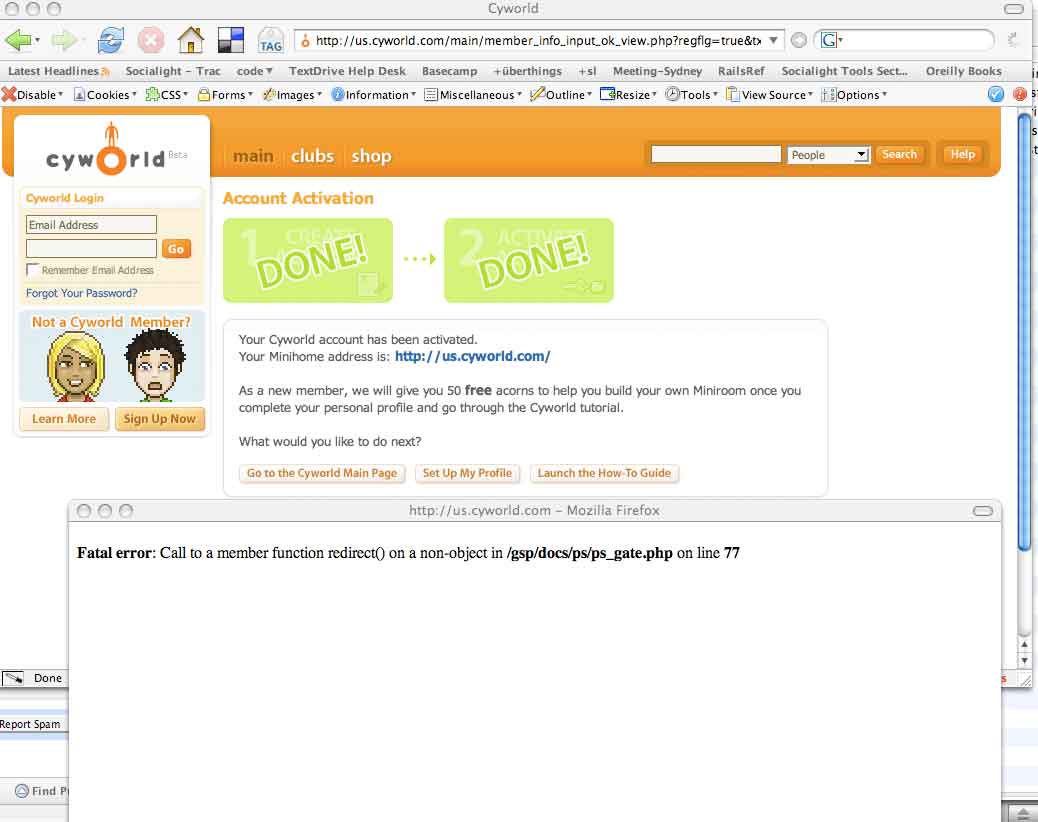
The US launch of the supercute Korean social network Cyworld was marred for me (and many others) by a PHP error which prevented me from completing my profile.
Cyworld Buggy
Sheesh!

You’d think that the experience of running the largest social network in Korea as well as having branches in Taiwan, Japan and China would have prevented this type of faux pas on day 1.

I guess it just goes to show that no matter how accomplished you are, there’s always room for error.

Categories
Life

Bluetooth neologisms and portmanteaus

I was just writing something up for African Communications on Bluetooth, so I did a survey of some of the mashups out there – here is what I found:
Bluejacking – sending unsolicited messages over Bluetooth to any phones in the area. Derived from Bluetooth + hijack, although the only hijacking that occurs is that of the owners attention.

Bluetoothing/toothing
– a media hoax which claimed that people were using Bluetooth to set up random sexual encounters. The idea is great in theory – it’s like a flash mob for your pants! After hearing about it, I’ve always left my Bluetooth on in the hope of being ‘toothed one day by my dream mobile geek girl, but all I get are weirdly named SIS files which make me feel more like I’m being violated than being pursued. *Sigh*. Bring on the next mobile hookup technology please.

Bluesnarfing – stealing information from a wireless device (mobile phone, laptop, PDA etc) over a Bluetooth connection. Since it is a form of theft, bluesnarfing is generally illegal most places they have laws. See my earlier rant about how the OED gives a crap example for this.
Bluetooth fairy – “a person who walks around with the blinking glow of a Bluetooth headset permanently in one ear.” Har har har!

Bluetagging – tagging a photograph with Bluetooth IDs thanks to handy uploaders like Merkitys-Meaning and Chris Heathcote OR bluetooth enabled positioning sensors depending on who you speak to. I prefer the ID tagging definition to the sensor one – they should call those Bleacons or Bluecons or something equally horrid.

Bluechat – uh.. Bluetooth chat. Seriously. That’s it. Nothing more.

Bluedar – Bluetooth + radar. Strangely enough there’s only one entry on this in Wikipedia. Smells like an MIT-only club.

Bluedating – if only this worked! See Bluetooth hoax above.

Seriously folks, it sounds like we need more innovation in the Bluetooth + (insert your favourite activity here) world. C’mon. Bluebiking… Bluehiking… Bluespanking… Bluebanking etc etc ad nauseam. The list is endless. Let’s get some new memes flowing.

Categories
Life

Free remote backup: passwordless SSH + Rsync

If you’ve always wanted to backup your files to a remote server, but never really knew how – here’s a quick and easy way to do it:

1. Create a passwordless SSH setup
Login into your account on your [Linux, Unix, BSD, OS X] system. Type in

ssh-keygen -t dsa

Hit Enter three times.

This will create a .ssh directory in your home directory including some special encrypted files. Then type this – replacing the bits in bold with your own details

ssh user@thehost.com ‘test -d .ssh || mkdir -m 0700 .ssh ; cat >> .ssh/authorized_keys && chmod 0600 .ssh/*’ < ~/.ssh/id_dsa.pub

If you’re asked for a password, type in the password for user@thehost.com that you created.

Test your setup by typing:

ssh user@thehost.com

If it logs in without asking you for a password – you’re done with that part! If not, try googling or mail me and I’ll try to help you out.

If you want to add more authorized keys – like from other users, just add a number to the end of authorized_keys – like so:

ssh user2@thehost.com ‘test -d .ssh || mkdir -m 0700 .ssh ; cat >> .ssh/authorized_keys2 && chmod 0600 .ssh/*’ < ~/.ssh/id_dsa.pub

Test it out by typing:

ssh user2@thehost.com

2. Back it up

Once that’s done, you need to set up rsync to back up your files. Type something like this:

rsync -e ssh -avz –delete /mydir/to_backup_up/ user@myhost.com:/mydir/backup/ >> ~/backup.log

Replace (a) /mydir/to_backup_up/ with the directory you want to backup (b)user@myhost.com with your username and host details (c) /mydir/backup with the remote folder that you will be backing your data up to and (d) ~/backup.log with the name of the file you want to log the output to.

If you want to automate this, type crontab -e and then add this:

30 * * * * rsync -e ssh -avz –delete /mydir/to_backup_up/ user@myhost.com:/mydir/backup/ >> ~/backup.log

Replace all the bits in bold, save it and then this should backup your data every 30 mins.

Enjoy!!